Stuck in No Results Found
A dead search is usually a missed token on screen — not a broken Steam install.
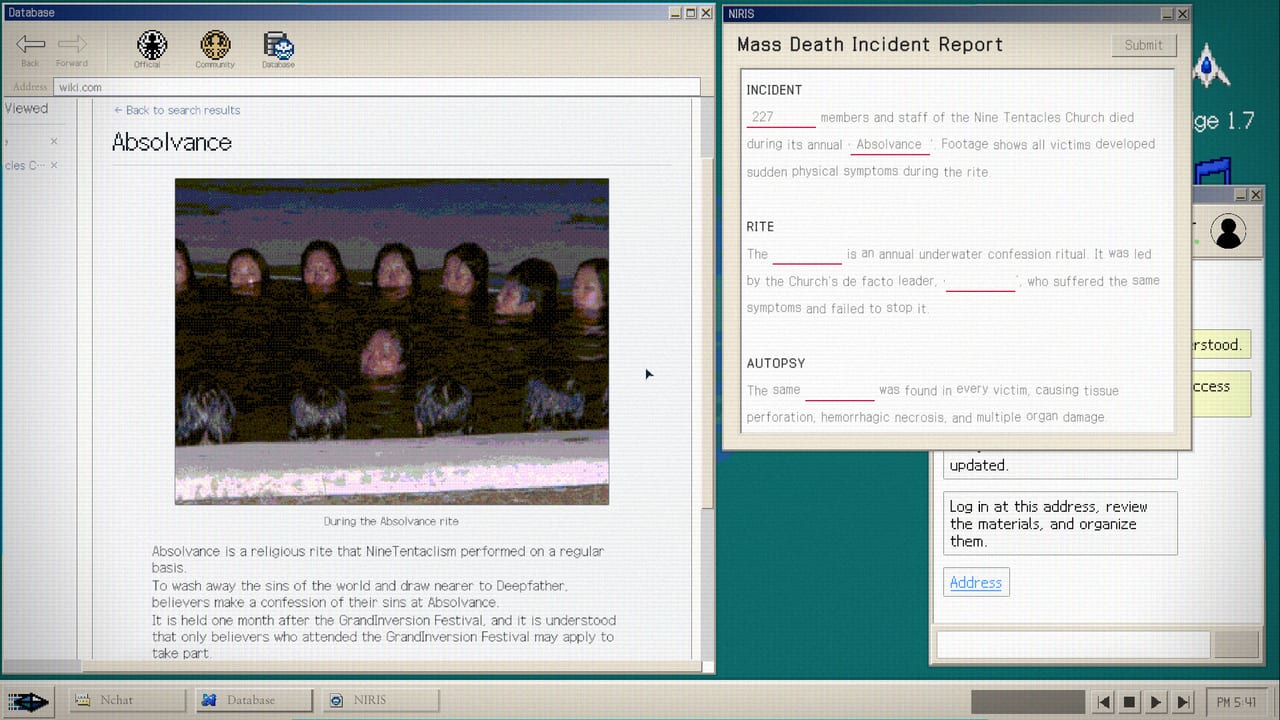
Most players who open Steam discussions for No Results Found are not looking for lore. They are looking for the next string. This page is the triage desk. It assumes you already sat through How to Play and tried How to Search. It does not dump the full Walkthrough on the first line. Use spoilers only after you burn the checklist.
Confirm you are on a current build first. Patch 1.0.1 fixed non-16:9 screens and input fields. Patch 1.1 revised terminology and search tags and bundles Patch 1.0.2 Japanese fixes plus wider report answers. If your display is black or your search bar eats characters, update before you open spoilers.
Dead search page
If the results pane says nothing useful, stop inventing English nouns. The index is finite. Go back to the last cluster you read and copy, do not paraphrase: usernames under comments, joke punchlines, photo captions, street signs, snack names in the room, mail dates, both spellings of a person (Marco versus Makor is the launch example). Search Korean and English forms if you swapped language. After 1.1, re-copy tags from the live UI; launch-week screenshots go stale when terminology changes.
Keep the Search Notebook open. Write three candidates before you type the fourth. If ten guesses miss, you are staring past a token that is already visible.
Cannot find the members-only board
The public Church site is a front. The members-only community is nested behind it. Steam already has threads about that wall. Method without every URL sits on Hidden Community. Spoiler path sits on the Walkthrough. Do not mail the developer for the address; mail is for crashes.
Wiki blanks and the “true nature” sentence
The desk encyclopedia is a second game after the community phase. Fill-in-the-blank lemmas and blue links are intentional. Method for that layer is the In-Game Wiki page. If a sentence begins like the Steam thread about true nature, you are on the main path, not a side quest. Screenshot chats before they auto-advance; several reviews named that friction even after early patches.
Organization chart will not complete
Model NIRA Employee wants everyone identified. Confirm each name on two surfaces before you pin. Spelling traps are designed. Read Organization and the Key Figures file for how masks become legal names without dumping every slot. Empty slots are not “close enough” for Accuse or Connive.
Report field rejects your answer
Reach the report only after the chart is honest. Accuse and Connive are the two filings on Endings. After 1.0.2 / 1.1 the accepted-answer range is wider, so a near-match may now pass. If it still rejects you on a current build, screenshot the prompt and mail [email protected]. That is a bug lane.
DODGE is destroying your evening
DODGE is optional. Maniac is over 1,000. Master is over 2,000 and sits near the bottom of global unlocks. Finish Accuse or Connive first. Then read How to Beat DODGE. Do not open the minigame in the middle of a wiki blank streak.
Language and localization walls
Play in the language you read fastest. Japanese players should be on 1.0.2+ for mistranslation fixes. Korean players often find the community voice hits hardest in Korean; the loop is the same in English. Untranslated UI leftovers were targeted in 1.1; remaining wrong-language buttons are bug-mail material.
When to open full spoilers
Open Hidden Community when twenty minutes on the public site produced no private board. Open the Walkthrough when the chart is half full and every search dies. Open Endings when you can file but do not know what Accuse versus Connive means. Open the Review only after you care about tone, not tokens.
The embedded video below is a real investigation session, not a fake ID. Watch how the player treats the browser as the whole verb list. Then return to your own desk and copy what is already on screen.
If nothing on this checklist matches, you are either on an old build or you skipped the memo. Update Steam. Write the last three proper nouns you saw. Search them exactly. That is the game.
Frequently Asked Questions
Quick answers for investigators who just hit a dead search.
Is a dead search a bug?
Usually not. Update for input and tag fixes, then re-copy usernames, comments, and photo text exactly.
Where is the hidden community address?
Method on Hidden Community; full spoilers on the Walkthrough. Do not mail the developer for puzzle answers.
My report answer will not accept.
Update to 1.1 for wider accepted answers, finish the org chart, then retry. Persistent rejects on a current build are bug-mail.