How to Search in No Results Found
The game is a closed index. Stop guessing the internet. Start copying the screen.
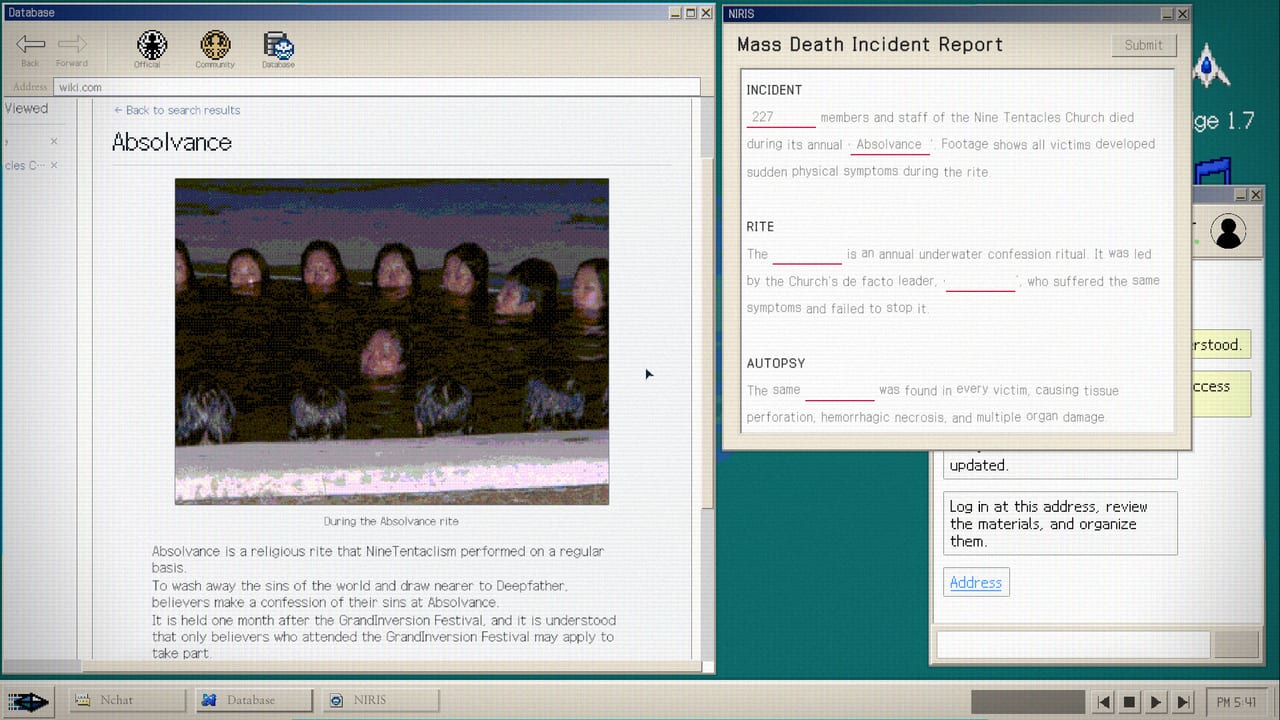
Every stuck thread about No Results Found is a search-discipline problem. The engine will not autocomplete the next plot beat. It will return a page if you type a token that already exists in the case file. Steam’s own blurb says to search unfamiliar words, suspicious words, and even the takoyaki you had as a snack. That sentence is a design document, not flavor.
This page stays on method. Exact community addresses and fill-in-the-blank answers live on Hidden Community, the In-Game Wiki page, and the Walkthrough. Keep the Search Notebook beside you if you want a printable checklist.
The search-inference loop
Read. Infer. Type. Compare. Pin. Repeat. A community joke becomes a keyword. The keyword becomes a username. The username becomes a second post. The second post names a place or a date. The date on an email disagrees with a chat. That disagreement is the next query.
You are not querying Google. You are querying a authored dataset. If a string feels clever but is not on screen, it will bounce. If a string looks boring but sits in a comment, it will open a branch. Korean reviews keep saying the same thing: throwaway replies and nicknames later click into place. Trust the small text.
Surfaces that hide tokens
Post titles are the obvious layer. Read the body anyway. Then read every comment. Then look at the username that posted the comment. Then look at the avatar or mask if the UI shows one. Then look at attached photos: signs, receipts, food, clothing, room numbers. Then look at timestamps. Then look at how someone types: slang, honorifics, a repeated misspelling.
Mail is a second surface. Subject lines, signatures, and dates are queries. File names are queries. Locked folders are a prompt to find a password string elsewhere, not a brick wall. The in-game wiki, once it opens, is a third surface: articles link to articles the way a real wiki does, and several reviews say that rabbit hole is the late-game pleasure.
The physical room is a fourth surface. Official copy mentions snacks. Achievement Government-Approved Medicine is “lose yourself in the music,” which means the audio on the desk is interactable, not ambience. If you only live in the browser you will miss tokens the trailer is waving at you.
Spelling traps and language pairs
A Korean review spoiler-tagged a useful warning: the game trains you to search Marco. Makor is the trap. The lesson generalizes. When two spellings appear, search both, then trust the one that returns a person you can pin on the organization chart. Do not assume the English localization cleaned every nickname.
If you play in English, still copy strings exactly. If you play in Korean or Japanese, copy those strings exactly. Mixing a translated gloss with an in-world proper name is how you get a genuine “no results found” page, which is also the title of the game and a joke the ending leans on.
What to do when every search dies
Stop inventing. Scroll back. Open the memo and list every proper noun you have seen in the last ten minutes. Search the ones you have not tried. Search objects in the last photo. Search the last date. Search the last slang. If you still have nothing, you are probably on the community-address wall or a fill-in-the-blank report. Those are documented in Steam discussions already. Open Hidden Community for the address, the In-Game Wiki page for the encyclopedia layer, or the Walkthrough for the blank that starts “However, its true nature turned out to be.”
Do not mash the same keyword with extra adjectives. The index is not fuzzy in a helpful Google way. Extra words usually make a miss. Shorter, exact tokens win. On the wiki layer, even a middle word from a long report title can miss; copy the full lemma or a tag. That stricter habit is why the In-Game Wiki page exists beside this one.
How search ties to achievements
Search Rookie is ten searches. Search Addict is a hundred. You will hit ten without trying. A hundred is a completionist loop: keep querying leftover wiki lemmas and community jokes after the story is over, if the build still lets you. Closer to the Truth is “you’ve viewed most of the community,” which is a reading achievement, not a combat one. Model NIRA Employee is identifying everyone on the chart, which is what all of this typing is for. Details sit on the Achievement Tracker.
Ethics of a no-hint game
The designers want you to feel like an investigator. Using this page as a method coach is in-bounds. Jumping to spoilers the first time a joke post appears is how you skip the only mechanic. If you have already spent twenty minutes on one screen, you have paid the design. Then it is reasonable to open the spoiler files.
For Church vocabulary that keeps showing up in searches, read the Church case file. For who you are as the searcher, read NIRA. For how the report splits, read Endings.
Frequently Asked Questions
Quick answers for investigators who just hit a dead search.
Why do my searches return nothing?
You are probably typing a paraphrase. Copy a token that is already on screen: a username, a photo object, a date, or a spelling the documents use.
Should I search in English or Korean?
Search in the language of the string you saw. The case file is authored. Translated guesses often miss.
Is takoyaki really a clue?
Steam's store page uses it as the example of an everyday object you should search. Treat room items as queries.